PRESENTATION TOOLS IN THE CLASSROOM

http://schoolsearchnow.com/associate-graphic-design-multimedia/
Why would any instructor want to use multimedia materials in the classroom?
Well, it is very clear to us all that using ICT's in the classroom removes the traditional style of teaching with a modern method and teaching which plays an important role in student evaluation...
But why does presentation tools matter you ask?
Presentation tools that teachers use in the classroom with their students for learning is one of the best ways to get students to use technology! No matter the topic, creating proper visual presentations to your students creates a high engagement level to help students get their point across. These technologies help students learn best practices for using software helping them organise their thoughts around a topic. Using presentation software is to use resources teachers find in the media and complement the ideas with text to create a persuasive message to students.

What it has taught me
When considering using these presentation tools as a resource for student learning and engagement, my first thought was PowerPoint. Easy to use, students get it and why use anything else that wont work as well. My ignorance towards this topic has clearly taught me otherwise and has created further thinking and I am now giving myself further opportunity to create a better learning environment using tools such as Sutori.

http://doverdlc.blogspot.com/2017/12/sutori-stories.html
Featured snippet from the we

https://www.communicationstudies.com/how-technology-in-the-classroom-is-changing
Why Sutori?
Sutori has taught me that it is a unique presentation tool that can be used in the classroom that will feel most natural to students. It is a visual presentation that allows for proper interaction which makes teaching and building resources on a topic simple and organised. Educators lose valuable time during lessons whilst using several resources such as Google slides and PowerPoint. Using Sutori allows all of the formats used in the classroom to be all in one place.
Using Sutori as a presentation tool in the classroom simply brings teamwork and collaboration into the equation. It allows the educator to create class discussions which ignites student curiosity whilst adding multiple resources into one presentation to create further understanding. Below is a video for beginners using Sutori for the first time.
Student Safety
All digital tools in the classroom including the use of Sutori is only meaningful and beneficial to students if used in a safe ethical manner. It is important that students are taught the basic safety and handling rules of the website before allowing them to jump in and create pages that may be seen by the public. The features on this website allow teachers to create pages that only them and their classmates can see, comment and collaborate on. The safe, responsible and ethical use is an important part of teachers work and student learning.

Features
Sutori has many features and one being that it allows you to add images to text, if images are chosen well that relate to text used, it will add depth and meaning to the words. Videos sourced from YouTube are able to be used and cut into smaller videos which is simple to do. At the end of the Youtube link, add: "&start=XXX&end=XXX" -- XXX being the number of seconds.
Sutori allows you to use more than just images and videos. The website allows you to put website pages and resources directly into your presentation by copying and pasting the link to Google Docs, Tweet, Quizlet etc etc! Sutori also allows teachers to upload some of thei own audio to the presentation which will give an extra dimension to a story. Why not create something extraordinary for the students?
Here is an example page created by me using Sutori. The information provided looks at Digital technologies in the classroom and some safety tips and vidoes for teachers and students to look at.
https://www.sutori.com/story/untitled--FXVwaaEetKM2aqiWfhP1F3UB
It is important to allow student's to have their input and give their thought on a topic, the sequence below shows how it is possible.
1. Create your Class
From the opening Teach Page on the main screen, go to My Groups and Create a Group.
2. Add Your Students
Once a class is created, you will see a group code in the colour blue. This code is to be shared with the class. Once the students have set up an account, they will be able
to join the group.
3. Create a Story
Once created, teachers can create presentations for the students, quizzes and
assignments to teach lessons. Once they are created, you can share them with the class. Best part is, student's can give feedback on the learning and it is easy to improve for next time.
4. Managing the Classroom
Once the students join Sutori, they are able to create their own website, put relevant information on it which the teacher will be able to see and from there, comment and give feedback.
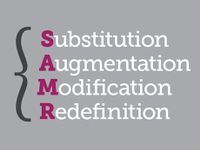
SAMR Model
The SAMR model below shows how this can be successfully implemented into a classroom.
Substitution: Students read from a set text on sport psychology and read it together as a class
Augmentation: Students take a quiz created by the teacher that is based on digital text provided based from the set text they are covering using a word processor to type their answers.
Modification: Students are asked to write and answer set questions based on visual text with visuals found on YouTube and put on Sutori by the teacher. A video and audio recording of the students performing in the sport and how they are showing different signs of psychology.
Redefintion: Students are asked to join small groups to create their own Sutori page while using different resources including: YouTube, voice recordings on their playing ability, published writing and images that relate to a text so it tells a story. In doing so, students are essentially creating their own mini website using their own videos. Once the videos and website is created, they will be put out to the rest of the class for feedback. The feedback received to each student will help with their learning progression.
The SAMR model below shows how this can be successfully implemented into a classroom.
Substitution: Students read from a set text on sport psychology and read it together as a class
Augmentation: Students take a quiz created by the teacher that is based on digital text provided based from the set text they are covering using a word processor to type their answers.
Modification: Students are asked to write and answer set questions based on visual text with visuals found on YouTube and put on Sutori by the teacher. A video and audio recording of the students performing in the sport and how they are showing different signs of psychology.
Redefintion: Students are asked to join small groups to create their own Sutori page while using different resources including: YouTube, voice recordings on their playing ability, published writing and images that relate to a text so it tells a story. In doing so, students are essentially creating their own mini website using their own videos. Once the videos and website is created, they will be put out to the rest of the class for feedback. The feedback received to each student will help with their learning progression.
Australia, I. A. ( January 25, 2019). Security Tips to Stay Safe Online.
Community, B. (2019). SAMR Model.- https://www.byron226.org/apps/pages/index.jsp?uREC_ID=1009886&type=d&pREC_ID=1319598
Generator, E. (2020). Multimedia Principle.
McHugh, S. (April, 2018). Digital Literacy Blog. Sutori Stories.
Now, S. S. (March 10, 2015). Associate Graphic Design &
Multimedia.
Studies, C. (September 6, 2015). How Technology In The Classroom Is Changing.
Sutori. (2020).
Student Tutorial.
Good evening Trent,
ReplyDeleteThank you for your post! I haven't come across Sutori before, it looks like a really good resource. It kind of reminds me of Google Drive, but in a FaceBook kind of format? A bit odd, but definitely has potential in the classroom. I like how it's really visual too.
I think a few screenshots of you taking us through the set-up process like you've outlined in writing (Step 1. Create your class, etc.) would have revealed a little more about the program. You have the video in there but it's rather long and many viewers probably won't sit through the whole thing. Including a few medium-sized screenshots of the program would add greater readability and make your post easier to follow.
It would also be awesome if the link you've included to Sutori was imbedded in the post so I could click on it and not have to copy and paste it into a web-browser :) Doing the copy and paste thing is completely fine of course, but embedding the link would add a little bit *more* you know?
Just one last piece of feedback, in your SAMR model, you mention for 'S' that students are to read from a set text as a class and then answer questions on a worksheet. For the 'Substitution' stage, this is where you substitute something not digital for something digital, but basic. Using your activity as an example:
Baseline Activity: students read a page from a book and answer some questions about the text.
Substitution: 'substitute' a hard copy of the text for a digital copy that you've posted on Sutori. Then the students use a word processor (like Microsoft Word) to answer the questions.
Augmentation: students read a digital text accompanied by visuals. They then answer a mix of basic understanding and comprehension questions based on the multiple related digital texts they have interacted with. Their answers are typed using a word processor, and they make use of grammar and spelling checker tools to edit their writing.
Modification: students read a digital text accompanied by visuals. They must answer an in-depth comprehension question based on the text in a voice-over format, and present it as a video. They must include key visuals and supporting quotes from the original text to support their points. The video is uploaded to a class Sutori and viewed by peers and parents at an end-of-Term screening.
etc. etc...
Sorry, I got a little carried away there :) SAMR can be quite complicated, and I'm not sure if my understanding of it is 100% correct either, but I hope at least a little of what I mentioned helps?
Thanks again for your post, and for introducing me to a new digital medium!
Have a great Easter weekend.
- Annaliese
Hi Trent. Thanks for your information about Sutori. I had only glanced at Sutori previously, but it obviously offers more than I first thought. Getting students to create their own could be an effective activity.
ReplyDeleteYou mentioned your first instinct is usually to use PowerPoint. This isn't necessarily a bad thing though, PowerPoint has a lot more to offer than what most people are aware - it's worth exploring what it can do apart from the old dot-points. The virtual museums that were mentioned are an example. I have looked at PowerPoint on my blog if you're interested.
Lastly, I would echo what Annaliese has said regarding the substitution stage of the SAMR model. This stage is where technology is used as a substitute for something to enhance learning, like substituting a paper quiz with an interactive Google Forms quiz like you mention in your Augmentation phase. Annaliese has given some solid advice though, so I'll leave it there.
Thanks for your post!
Chris
Trent
ReplyDeleteThank you for your post and your experimental approach to finding out what is possible with Sutori. Well done for providing a sample presentation that you have created. I echo some of the thoughts of others when I suggest that embedding this file would keep your reader's attention focused on your blog post rather than being directed away with two more steps to follow.
Well done for your attempt with SAMR application. It is a bit tricky but your example is getting there. You have a basic understanding of what the framework is trying to achieve but this needs further refinement. Keep referring to Puentedura's explanations of the different levels. Annaleise has provided some excellent advice there.
Overall, well done.
Glenda